
Style Guide

Summary[edit]
Welcome to the Style Guide for the Factory Town 2 Wiki. The purpose of this guide is to provide new contributors basic details on the formatting and styles used throughout this wiki.
This guide is not set in stone and can change over time; however, try to stay as close as possible when creating content for the wiki. A consistent format helps readers find and comprehend the information quicker.
If you have questions about a style, please reach out to the Wiki admins or make a comment in the Wiki Discord Channel.
General Guidelines[edit]
- Be respectful to all contributors. Please do not get upset if your updates receive grammatical changes or improvements.
- Please read and follow the Rules to the wiki.
- The default language for Factory Town 2: Paradise is US English, so the wiki follows that default language. Additional languages are being evaluated.
Examples of US English:- Color not Colour
- Aluminum not Aluminium
- Sulfur not Sulphur
- Labeled not Labelled
- Signaling not Signalling
- The wiki uses Title Case for Section Names (Getting Started) and in-game components, such as Items, Vehicles, Buildings, ect. For more details on Title Case, see Title Case.
- For sentence structure, list formatting, and other grammatical structures, the wiki follows Microsoft Writing Style Guide.
- Where possible, the wiki follows the standard Mediawiki formatting.
- The Wiki uses the Oxford/Serial comma in lists. For example: The game allows you to place cows, chickens, and sheep.
Getting Started[edit]
Before you can work on Wiki pages, you must either create an account or sign into your existing account.
Note: Erik nor the Wiki admins are responsible for log in issue or issues with your account. Please file a ticket with wiki.gg if you have log in issues.
Working on Pages[edit]
Users who have created an account with wiki.gg can Create pages, edit pages, and upload images.
To conserve space in this section, images are collapsed under the Details expand/collapse feature. Select the Details drop-down to view the image.
Creating a New Page[edit]
- If needed, follow Steps listed in the Signing into a Wiki.gg account section.
- Do one of the following:
- Create a missing page. These are pages that are referenced in the Wiki, but do not exist. Selecting one of these pages will create the page name automatically.
- <details style="border:none; padding:0; margin:0;">
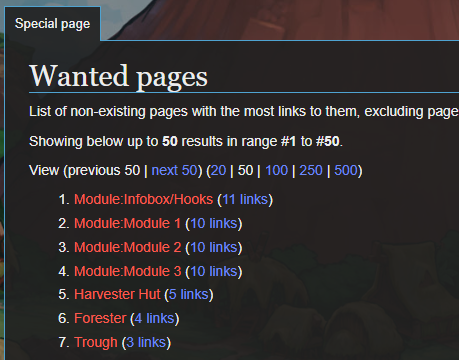
- </details>
- Create a Special:New Page from scratch. These are brand new pages that may not be referenced in the Wiki.
- Enter a page name in the column to the right of the Class column. Note: For most pages, the contributor leaves the class field set to (Main).
- <details style="border:none; padding:0; margin:0;">
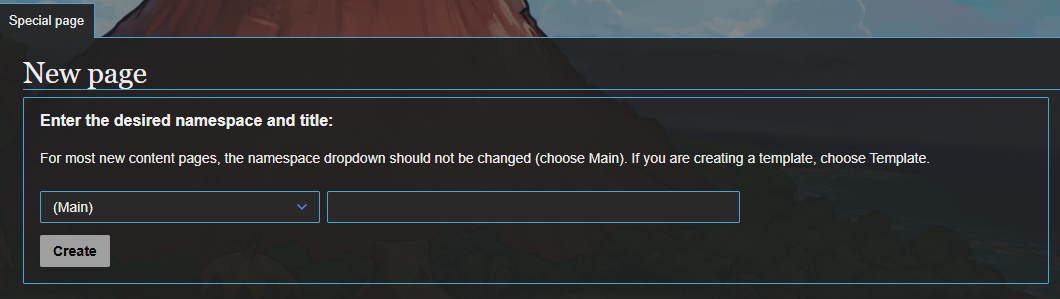
- </details>
- <details style="border:none; padding:0; margin:0;">
- Select Create. The Creating Style Guide page is displayed.
- If there is an available template or premade page, it displays at the top as a text hyperlink.
- <details style="border:none; padding:0; margin:0;">
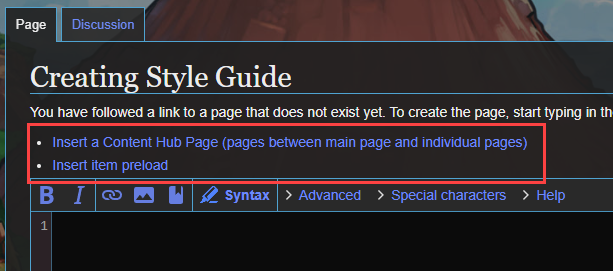
- </details>
- <details style="border:none; padding:0; margin:0;">
- Use existing pages as a guide/template to create the new page. If you have questions, please reach out to the Wiki Admins or post your question in the FT2 Wiki Discord channel.


Editing Pages[edit]
- If needed, follow Steps listed in the Signing into a Wiki.gg account section.
- Go to the Factory Town 2: Paradise wiki page that you want to edit.
- In the upper-right corner of the page, select the Edit Source hyperlink. Note: Please do not use the Edit tab as some of the formatting will not render correctly.
- <details style="border:none; padding:0; margin:0;">

- </details>
- <details style="border:none; padding:0; margin:0;">
- Make changes as desired. Note: If you have questions, please reach out to the admins in the Discord #ft2-wiki channel.
- At the bottom of the page, select Show preview to view changes before saving them.
- If needed, make corrections.
- When finished, select Save changes at the bottom of the page.

Uploading Images[edit]
Contributors can upload images to wiki.gg that support their update(s) or changes. Images must meet the wiki.gg requirements for size and format. Uploading inappropriate images, such as (sexually explicit content, hateful images, political images, ect.) will result in a Permanent Ban.
- If needed, follow Steps listed in the Signing into a Wiki.gg account section.
- In the left navigation panel, select the Upload image/file text hyperlink or Click Here. The Upload image/file page is displayed.
- <details style="border:none; padding:0; margin:0;">
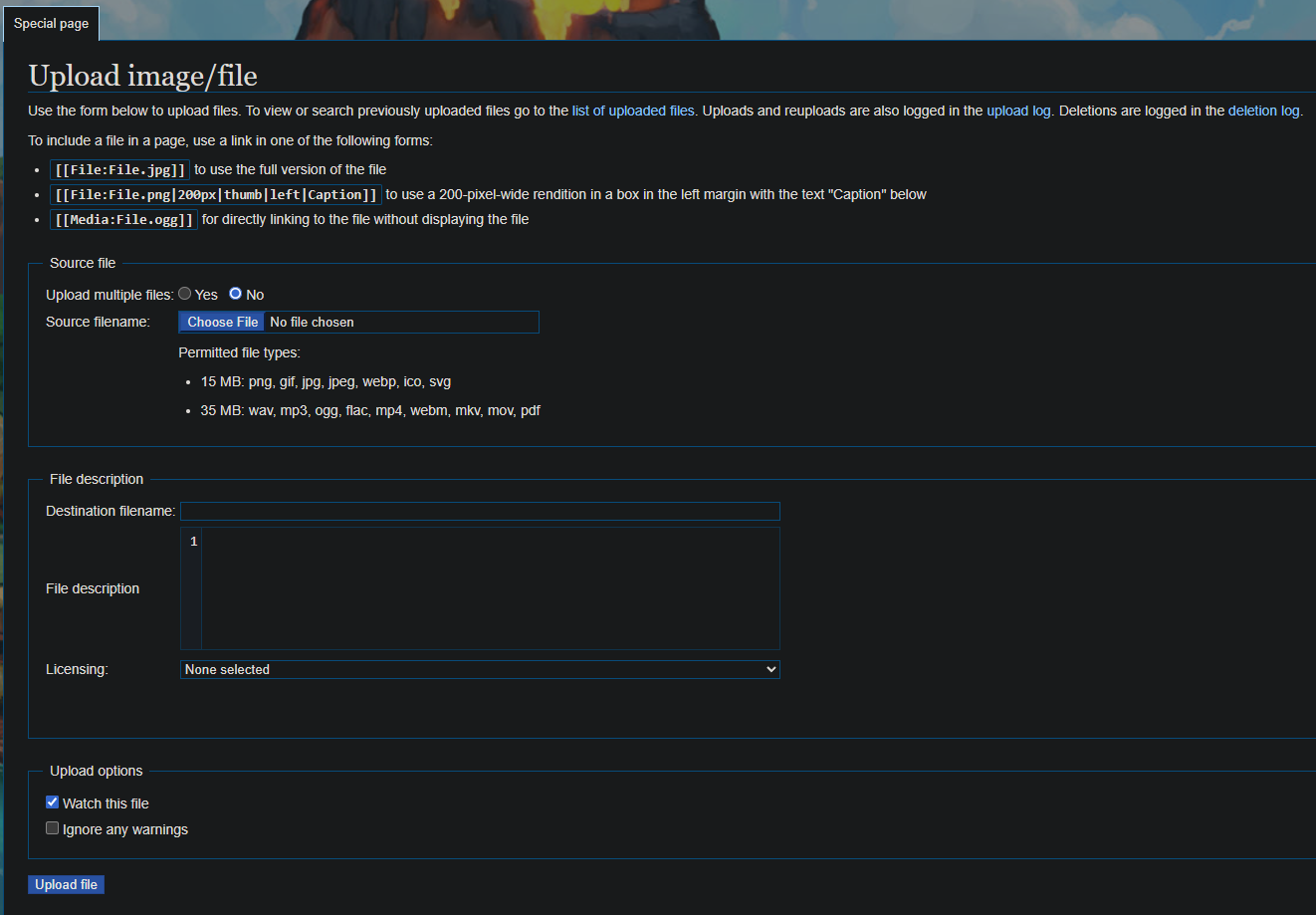
- </details>
- <details style="border:none; padding:0; margin:0;">
- If uploading one image go to Step 5.
- Select the Yes radio button.
- Select Choose File. The browser's Open pop-up window is displayed.
- Select the image or images.
- Select Open. A preview displays next to the upload section.
- If uploading multiple images at the same time, you can enter a Category Name for the images. A category name is a way to group the images.
For example, let's say you are uploading five images of new items. Adding "Items" to the Category Name field will group all of those items with the other categories. - Enter a description in the File description field. For example, Initial Upload.
- Select the Licensing field and select the appropriate license for the images. For details, see the License page.
- If you don't want notifications about changes to this image, clear the Watch these files check box.
- When ready, select Upload files. The files are uploaded to the wiki and can now be referenced like this [[File:<Name of File>.<extension>|<px width>]].

Recent Changes[edit]
List of abbreviations:
- N
- This edit created a new page (also see list of new pages)
- m
- This is a minor edit
- b
- This edit was performed by a bot
- (±123)
- The page size changed by this number of bytes
30 July 2026
|
|
N 18:07 | Factory Town 2 Wiki:About 3 changes history +1,509 [Admin (3×)] | |||
|
|
18:07 (cur | prev) +168 Admin talk contribs (→Independence) | ||||
|
|
18:06 (cur | prev) −74 Admin talk contribs (→Independence) | ||||
| N |
|
17:54 (cur | prev) +1,415 Admin talk contribs (Created page with "= About This Wiki = Welcome! This wiki is an independent, community-driven resource for Factory Town 2, built with one goal in mind: a clean, fast, and genuinely useful reference — without the clutter. == Our Story == This site was created and is maintained by '''G00r''', a player of the game who found the existing wikis bogged down with intrusive ads and cluttered layouts. Rather than put up with it, g00r decided to build something better: a site focused on a clean...") | |||
|
|
N 17:57 | MediaWiki:Common.css 2 changes history +37,913 [Admin (2×)] | |||
|
|
17:57 (cur | prev) +33,645 Admin talk contribs | ||||
| N |
|
17:22 (cur | prev) +4,268 Admin talk contribs (Created page with "→=================================================================== Factory Town 2: Paradise Wiki — MediaWiki:Common.css Paste this entire file into: https://factorytown2.com/wiki/MediaWiki:Common.css ===================================================================: /* ------------------------------------------------------------------- 1. Theme colors (edit these to taste — everything below references these variables, so changing a color he...") | |||
|
|
17:19 | Main Page 2 changes history +1,301 [Admin (2×)] | |||
|
|
17:19 (cur | prev) +1,146 Admin talk contribs | ||||
|
|
17:18 (cur | prev) +155 Admin talk contribs | ||||
| N 17:13 | MediaWiki:Sidebar diffhist +876 Admin talk contribs (Created page with "* navigation ** mainpage|mainpage-description ** recentchanges-url|recentchanges ** randompage-url|randompage ** Special:SpecialPages|specialpages * contributors ** Wiki_Rules|Wiki Rules ** Style_Guide|Style Guide ** Special:WantedPages|Needed Pages * game-components ** Getting_Started_Guide|Getting started guide ** Animals|Animals ** Buildings|Buildings ** Compute_Blocks|Compute Blocks ** Crops_Trees|Crops & Trees ** Decor|Decor ** Game_Mechanics|Game Mechanics ** Ite...") | ||||
|
|
17:03 | (Upload log) [Maintenance script (2×)] | |||
|
|
17:03 Maintenance script talk contribs uploaded File:Access In.png (== Summary == Importing file) Tag: Server-side upload | ||||
|
|
17:03 Maintenance script talk contribs uploaded File:Academy.png (== Summary == Importing file) Tag: Server-side upload | ||||


Concepts:
- No pronouns (keep things to either "The Player" or just use verbs to describe a step or action, "This window is used to manage XYZ")
- No I, me, you
- Proper nouns
- In-game names, such as Volcano, Wheat, and House